
AI PDF Autofill in 2026: The Definitive Guide for Teams That Drown in Forms
If your team handles paperwork (visa packets, employee onboarding, insurance claims, government tenders, anything with a stack of PDFs), you've already done this math. The cost isn't the document fee. It isn't the postage. It's the seventy minutes a senior person spends retyping a passport number into the eighth form of the day.
PDF forms have not changed meaningfully in three decades. What has changed in the last 18 months is the technology stack available to fill them. AI-driven field detection, OCR running on commodity GPUs, and structured profile-to-field mapping have collapsed a workflow that used to require expensive enterprise software (or three contractors and a lot of patience) into something a small team can deploy in an afternoon.
This guide is the one I wished I had three years ago when I started rebuilding my agency's intake pipeline. It covers what AI autofill actually does, where it breaks, what to evaluate when choosing a tool, and the operational habits that separate teams who save 70% of their time from teams who buy software and see no improvement.
What "AI PDF autofill" really means in 2026
The phrase is overloaded. Three different products call themselves AI form fillers, and they solve three different problems:
- Autocomplete in browsers. Chrome filling your shipping address from saved data. Useful, narrow, not what we are talking about here.
- Single-document AI assistants. Tools that summarize a PDF and let you ask questions about it. Useful for legal research, not useful for filling 40 visa packets a week.
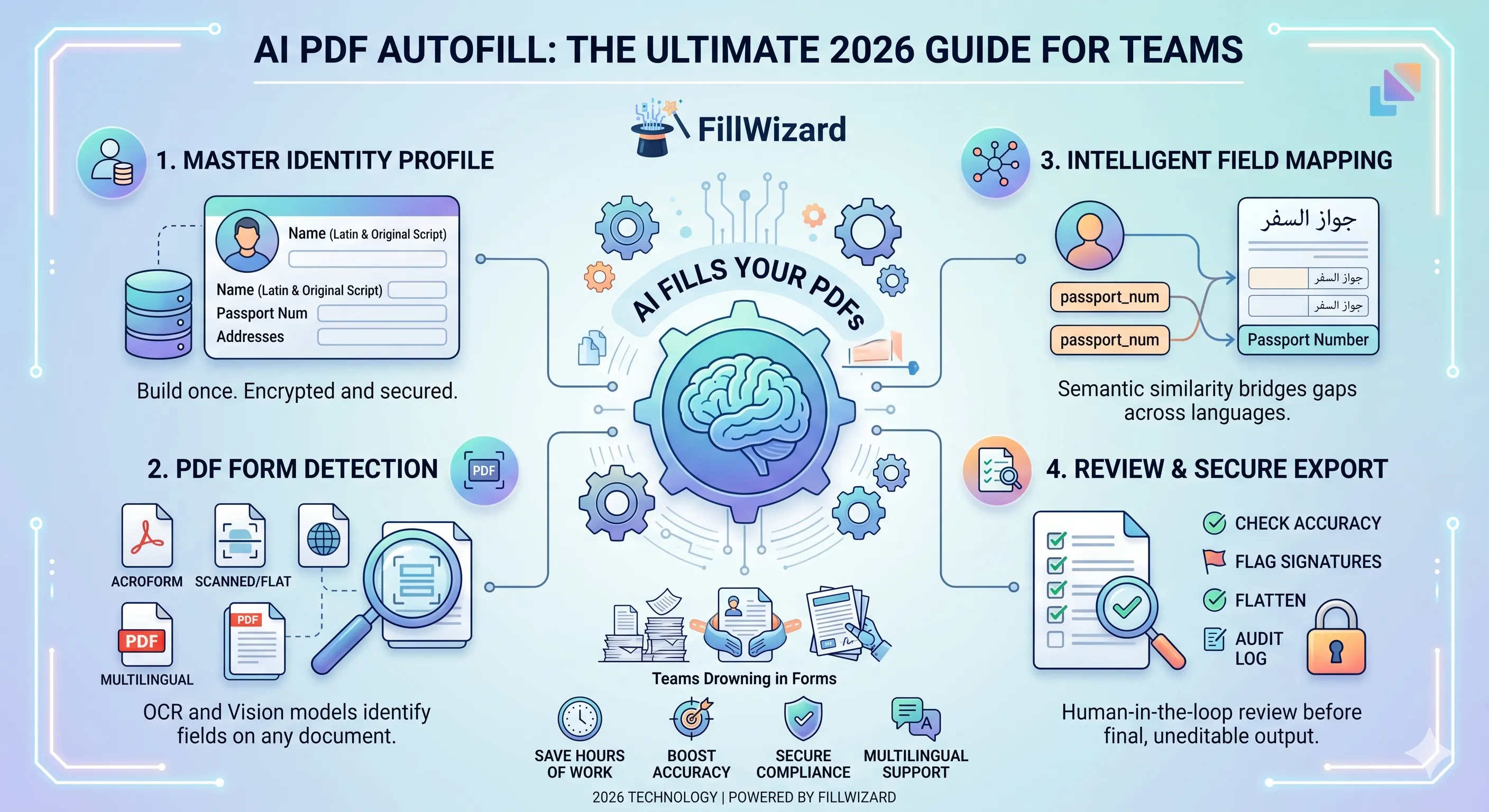
- Field-detection-and-fill engines. This is the category we mean. The software opens an arbitrary PDF, detects every fillable field (whether the form is structured or scanned), maps each field to the correct value from a stored identity profile, and produces a completed PDF.
Category three is what unlocks the time savings. The "AI" piece does two jobs:
- It detects fields. For an AcroForm PDF that is mechanical. For a flat or scanned PDF it requires a vision model to identify fillable regions and label them.
- It maps fields to data. A field labeled
passport_numin the PDF and a profile field labeledPassport Numberlook obvious to a human. To older tools, they were unrelated strings. Modern field mapping uses semantic similarity to bridge that gap automatically, even across languages.
Everything else (exporting the PDF, signing, sending) is mechanical plumbing.
The shape of a modern autofill workflow
If you strip away marketing language, every team using a serious autofill tool follows the same five-step loop:
1. Profile. A canonical record of an applicant or client: legal name in Latin and original script, date of birth, passport, address history, employment, family details. This is built once. Sensitive fields are encrypted and masked in the UI.
2. Upload. A PDF lands in the system. The engine inspects it: AcroForm? Scanned? A hybrid? It picks the right detection pipeline.
3. Detect. Fields are extracted with positions, types (text, checkbox, date, signature), and labels. For scanned PDFs, OCR + a layout model do the heavy lifting.
4. Map. Detected fields are matched to profile fields. Confident matches are filled automatically; ambiguous ones are flagged for human review.
5. Review and export. A human spends 60 seconds verifying dynamic fields (dates, purpose, signatures), corrects anything that looks wrong, and clicks export. The system produces a flattened, properly encoded PDF.
That loop replaces what used to be: open form, copy from previous form, paste, fix, save, repeat. The bottleneck moves from data entry to judgement.
Where AI autofill genuinely earns its keep
The teams I have seen get the largest gains share three traits.
They have repeatable applicant cohorts. Immigration agencies fill the same forms for the same applicant family across multiple embassies. HR teams onboard a new hire across health, payroll, IT, equipment, and legal forms in week one. Insurance adjusters complete ACORD forms in clusters per claim. The more repetition, the larger the gain. (For a worked example, see our insurance claim form workflow guide.)
They handle multilingual forms. A visa packet is rarely English-only. Schengen forms exist in nine languages. Embassies require both Latin transliteration and the original-script name on different forms. A profile that stores both halves and lets the engine pick the right one per form removes a long tail of manual translation work.
They face audit pressure. Government tenders, regulated industries, immigration filings: all of them require traceability. A workflow that logs which value came from which profile field at which time creates an audit trail no manual process can match.
If your team does not match any of these traits, AI autofill is still useful, but the ROI is more incremental.
What AI autofill is still bad at (be honest)
Selling tools is easy. Surviving deployment is harder. These are the failure modes I have seen often enough to mention upfront:
- Forms with very poor scan quality (faxes, photographed phone images at an angle) still need human cleanup. Quality in, quality out.
- Forms that mix structured fields with handwritten sections confuse the engine. The system fills the typed fields and leaves the handwritten part alone, which is correct behaviour but can trip up a reviewer who expects a single output.
- Highly conditional logic (e.g. "if you answered yes to question 12, skip questions 13–17") is not a strength of any current autofill tool. The engine fills what it can. Conditional skip logic remains a manual review step.
- Signature fields are not signed automatically. They are flagged. You add the signature with whatever signing tool you already use.
If a vendor tells you any of these are solved, push hard for a live demo on your worst real form.
The buyer's evaluation matrix
Most procurement processes for autofill software fail because the team evaluates on the wrong axes. Here is the matrix I use, ordered by what actually matters in production:
| Axis | What to verify |
|---|---|
| AcroForm + scanned support | Upload one of each from your real workload. Both must work. |
| Multilingual coverage | Test at least one RTL form (Arabic) and one non-Latin form (Cyrillic, Han) if relevant. |
| Profile model | Can you store dual-script names? Address history? Multiple sponsors? Custom fields? |
| Field mapping quality | Upload a form the engine has never seen. Measure how many fields auto-fill correctly. |
| Security | Encryption at rest, encryption of sensitive profile fields, no model training on your data, regional hosting, configurable retention. |
| Audit trail | Can you produce a per-document log of which profile values were used? |
| Export fidelity | Open the resulting PDF in Acrobat, Preview, and a printer driver. Are all fields visible? Are signatures preserved? |
| Bulk operations | Can you fill 20 forms for one applicant in a single action, or only one at a time? |
| Pricing model | Per-document, per-seat, or per-export? Match it to your actual workload pattern. |
A scoring sheet on these axes, applied to two or three vendors, will surface the right choice within a single afternoon.
Security is not an afterthought, even for "non-sensitive" forms
PDF forms contain identity data — by definition. Even a "harmless" HR form often holds tax IDs, banking, and dependents. Security model questions to ask any vendor in the order they matter:
- Where is the data stored? EU, US, both, choose? Some clients (especially in the EU and Gulf) cannot use US-only storage for GDPR or domestic regulation reasons.
- Is sensitive data encrypted at the field level? Disk encryption is table stakes. Field-level encryption with a customer-controlled key is the next bar. Look for it.
- What is the retention policy? A configurable retention window (e.g. delete originals after 30 days) reduces blast radius if anything goes wrong.
- Do you train models on customer data? The correct answer is "no, never." Anything else is a no.
- What audit logs exist? Per-document, per-user, exportable.
These are not exotic asks. Vendors who cannot answer these in a 30-minute call should not be on your shortlist.
Multilingual: the moat most teams underweight
One pattern keeps recurring: a procurement team picks a US-built autofill tool because it has the most polished marketing site. Six months later they realize the tool cannot fill a French embassy form because the field labels are in French and the mapping engine was trained only on English forms.
Strong multilingual support means three things:
- Field detection works on non-English forms. The OCR model has been trained on Arabic, Cyrillic, Han characters, and so on.
- Mapping works across languages. A field labeled
Nationalitématches toNationalityin your profile. - The profile stores multilingual content. Latin transliteration + original script + locale-specific formats (Arabic dates, Hijri vs Gregorian, French postal codes).
If you serve a multilingual audience, treat this as a hard requirement, not a nice-to-have.
How to run a 90-minute proof of concept
You do not need a six-week procurement cycle. Here is the test I run with new teams:
- Pick three real forms from your worst week. Not curated examples. The actual messy stuff.
- Build one applicant profile in the candidate tool. Time how long it takes.
- Upload all three forms. Measure: how many fields auto-fill correctly per form, how many need correction, how many are missed entirely.
- Export each filled PDF. Open it in three readers. Print one.
- Run a teammate through it cold. Can someone who has never seen the tool produce a filled PDF in under five minutes?
If steps 4 and 5 fail, no amount of feature breadth makes up for it. If they pass, you have a tool you can deploy.
Common objections, addressed
"Our forms are too specialized for AI to handle." That was true in 2021. By 2024, vision models had been trained on enough form-shaped images that this is now rare. Test, do not assume.
"We're regulated, we can't put data in the cloud." Many vendors offer regional hosting, on-prem deployment, or self-hosted variants. Ask before assuming you cannot.
"Our team won't adopt it." The adoption pattern that works is shadow-running the tool on one workflow for two weeks, surfacing the time savings publicly, and then expanding. Top-down mandates fail.
"It will replace our jobs." It will not. It will replace the worst part of those jobs (repetitive typing) and free people for review, exception handling, and client work.
Putting it together: a reference workflow
For an immigration agency, the deployed workflow looks like this. (Adapt the field names for HR, insurance, or government. The structure is the same.)
- Master profile built per applicant (and per family member) with passport, address, employment, sponsor.
- Form intake: forms uploaded as soon as they're requested by the client or embassy.
- Auto-fill runs in the background, producing a draft within seconds.
- Reviewer opens the draft, verifies dates and purpose-of-trip, signs flagged fields.
- Export and submit through the existing channel (email, embassy portal, courier).
- Audit log captures the run for compliance.
Time per packet drops from 60–90 minutes to 8–12 minutes. The bottleneck moves to client communication, which is where it should be.
Related reading
- The Ultimate Visa Packet Checklist: the framework above, applied to immigration work.
- HR Packet Review: Cut Onboarding Forms by 60%: the same playbook for hiring.
- Insurance Claim Form Workflow: ACORD-specific patterns and ROI math.
- Government Form Fill: Tenders and Permits: for procurement and licensing teams.
- AcroForm vs Flat PDF: How to Make Any Form Fillable: the technical foundation.
- FillWizard vs Adobe Acrobat vs DocuSign: direct tool comparison.
The next step
If you are still filling PDFs by hand in 2026, the question isn't whether to automate. It's whether you adopt early enough to capture the next twelve months of compounding gains, or wait until your competitors already have. Pick three forms, run the 90-minute proof of concept above, and decide on evidence. Not on vendor marketing.
Checklist
- Inventory the PDFs you fill repeatedly and group them by audience (visa, HR, claims, gov).
- Build one master identity profile per recurring applicant or client.
- Choose a tool that handles BOTH AcroForm and scanned PDFs from day one.
- Verify the security model: encryption at rest, audit logs, configurable retention, no model training on your data.
- Evaluate multilingual coverage including RTL languages and transliteration.
- Run a 60-second post-fill review checklist before every submission.
- Track a baseline metric (minutes per packet) for the first 2 weeks to prove ROI.
Related articles
 Tool Comparisons
Adobe Fill & Sign Alternative When Autofill Suggests the Wrong Name
Adobe Fill & Sign remembers more than you want. Wrong name. Previous customer's signature. Private medical details on the next PDF. This guide covers when to clear the cache, when to keep Acrobat, and when a reusable profile is the safer Adobe Fill & Sign alternative.
8 min readRead more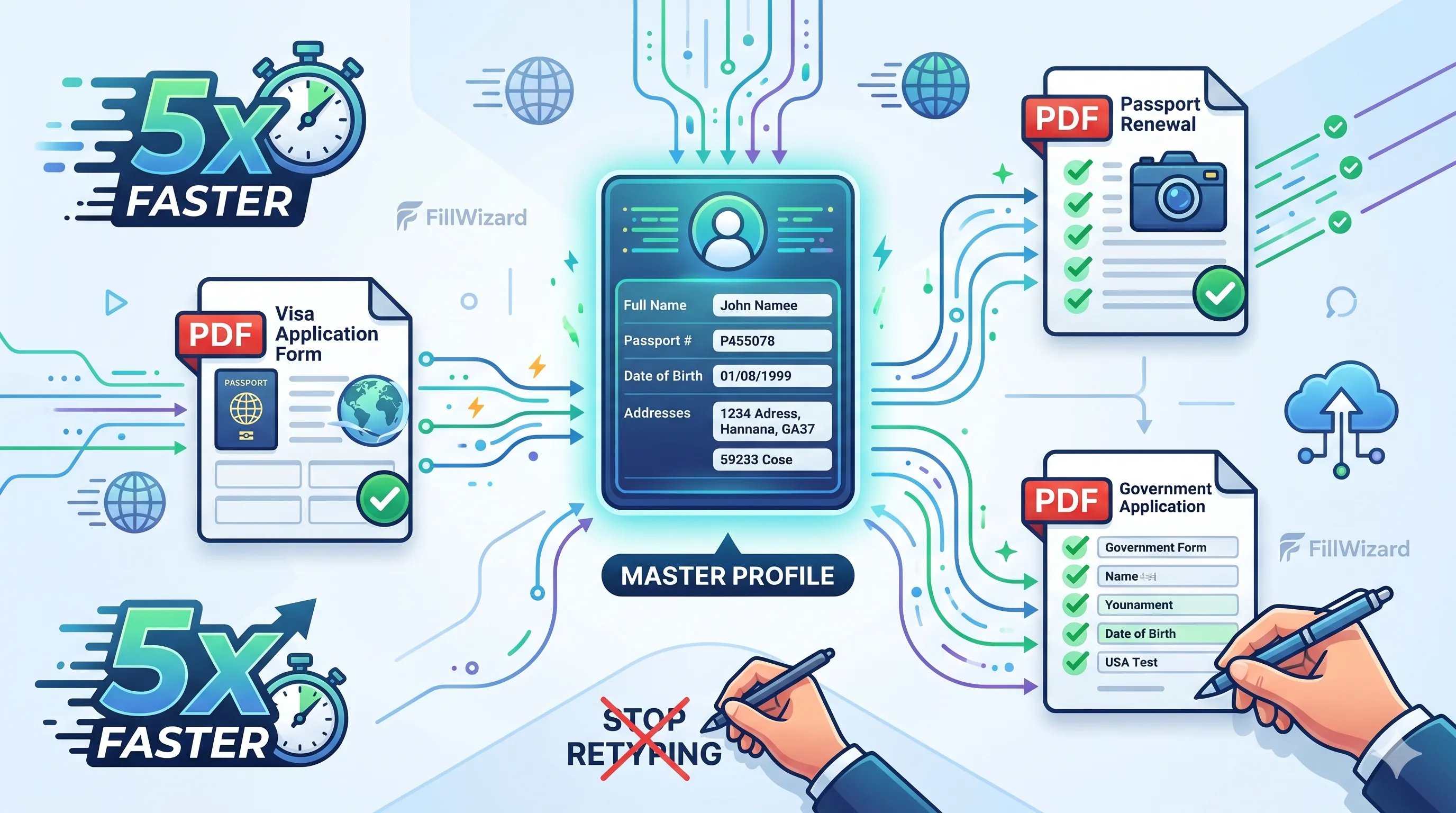 Productivity
How to Batch Fill PDF Forms from a Profile (Without Mail-Merge Pain)
Batch fill and prefill should mean enter once, fill many PDFs. Mail merge for fillable forms is the old workaround. A profile is the cleaner version of the same idea.
9 min readRead more Visa Workflows
DS-160 Family Application: Why the Family Button Still Makes You Retype Everything
A DS-160 family application is still one form per person. The family button on CEAC does almost nothing for shared fields. Profiles fix the retyping. CEAC still gets the final submit.
9 min readRead more