
The Insurance Claim Form Workflow That Cuts Adjuster Time by 60%
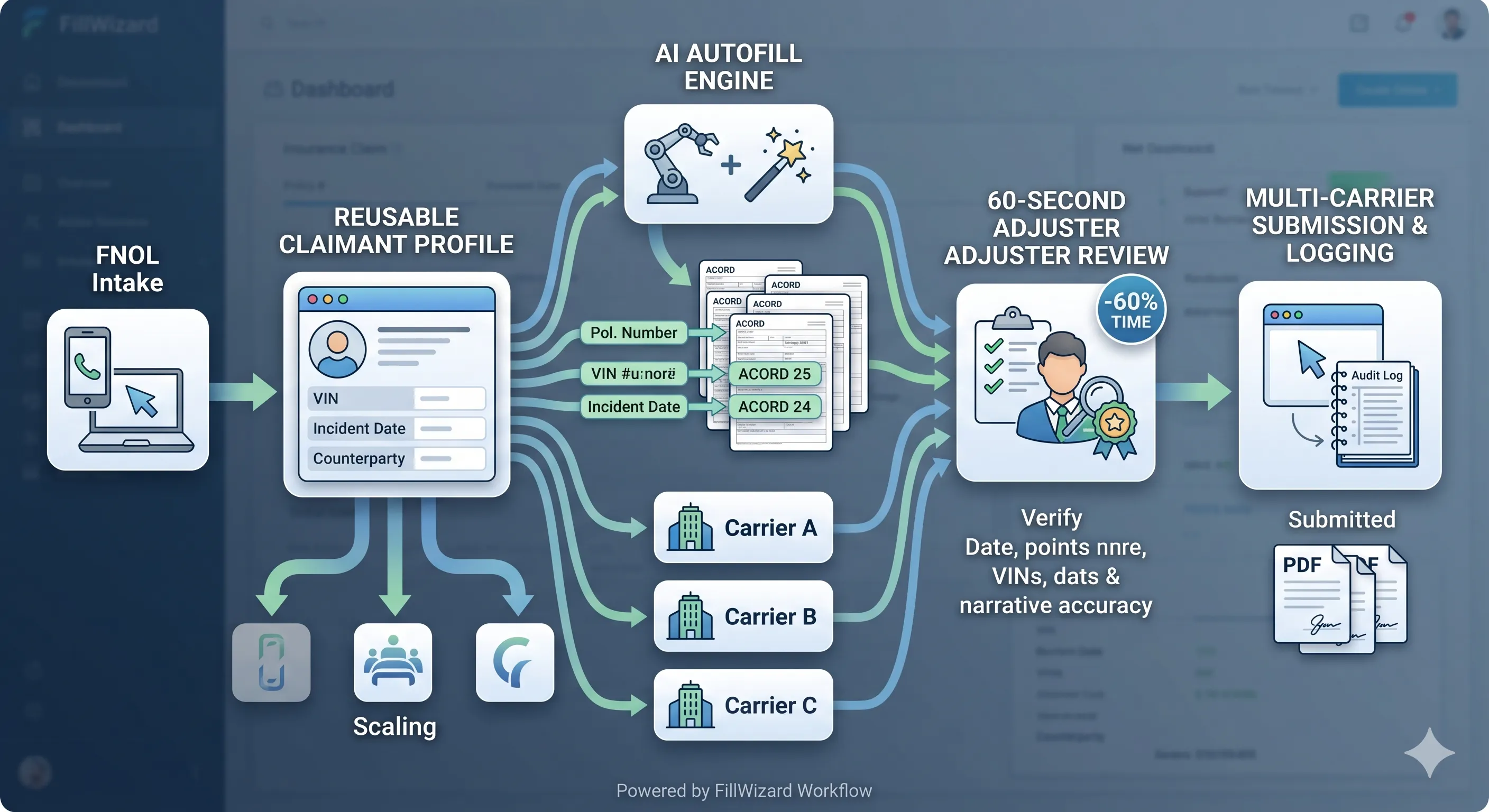
If you have ever watched a senior claims adjuster spend forty minutes copy-pasting a VIN, a policy number, and a date of loss into seven different ACORD variants, you already know the problem. Insurance claim form workflows are uniquely punishing because the data is structured, the forms are standardized in name only, and the volume is relentless. The cost is hidden inside payroll: experienced adjusters spending half their week on data entry instead of liability work.
The teams that have rebuilt their intake pipelines in the last two years have cracked something most of the industry has not: claim form filling is a data-mapping problem, not a typing problem. Solve the mapping once, and every subsequent claim takes minutes instead of hours.
This is the workflow we have helped half a dozen mid-sized claims teams implement. It is not theoretical. It is not vendor-pitched. It is what actually moves the time-per-claim number.
Why ACORD forms break traditional automation
ACORD forms are a strange artifact. They're nominally standardized: every property carrier accepts ACORD 24 (Certificate of Property Insurance), every auto carrier accepts ACORD 25 (Certificate of Liability). The reality is messier:
- Each carrier customizes the form layout. The standard form is a template; the carrier-specific version is what actually gets filled.
- Some carriers still circulate flat PDF versions that are not digitally fillable. They expect you to print, fill, scan, and email.
- The same data point (e.g. "policy number") appears in three different field labels across three carriers:
Policy #,Policy No., andPol. Number.
Older automation tools (built on rigid template matching) cannot handle this. They worked when one form mapped to one template. They fail when the same data has to project onto a moving target of carrier-specific variants.
Modern AI autofill tools handle this because they use semantic field matching. They recognize that Policy #, Policy No., and Pol. Number all refer to the same underlying value in the claimant profile. The mapping isn't "carrier X uses field name Y." It's "any field whose label is similar to 'policy number' gets the policy number from the profile." That single shift unlocks multi-carrier support without per-carrier configuration.
Read more on the underlying technical pattern in our AcroForm vs flat PDF guide.
The five-step workflow that actually scales
Here is the workflow our highest-performing teams use. It looks deceptively simple. The simplicity is the point.
Step 1: Build the claimant profile in one pass
Every claim starts with a structured profile. Build it during First Notice of Loss (FNOL) and never touch it again unless the underlying data changes.
A complete claimant profile contains:
- Identity: full legal name, DOB, contact, mailing address, primary language.
- Policy: policy number, effective date, expiration, deductible, coverage limits, named insureds.
- Asset: VIN/HIN/property address, year/make/model, valuation, photos folder reference.
- Incident: date and time of loss, location, description, weather conditions if relevant, third-party involvement, police report number.
- Counterparties: other driver/insured, their carrier, their policy number, their adjuster contact.
Build it once, in a structured tool. Forty fields max. Ten minutes if the claimant is on the phone, twenty if you are extracting from an FNOL email.
Step 2: Standardize evidence intake
Claims rarely live in the form alone. Photos, estimates, medical bills, police reports: all attached, all referenced. Standardize the folder structure:
claims/{claim-id}/
  profile.json
  evidence/
    photos/
    estimates/
    medical/
    police-report.pdf
  forms/
    acord-25-filled.pdf
    acord-24-filled.pdf
The benefit is not aesthetic. It is operational: when a senior adjuster picks up a claim from an associate, every artifact is in a predictable place. When subrogation reopens a claim two years later, nothing is missing.
Step 3: Auto-fill before any human typing
The cardinal rule of this workflow: no human types into a fresh form. Every form begins as an auto-filled draft. Every typing keystroke happens during review, not during initial fill.
To make this work, you upload the form (or a stack of forms) to your autofill tool, point it at the claimant profile, and let it produce drafts. A multi-form fill across an ACORD 25, an ACORD 24, and a carrier-specific intake usually completes in seconds.
For a deep dive on how AI autofill engines work, see our definitive 2026 guide.
Step 4: Apply the 60-second review checklist
Reviewing is where adjuster judgement actually lives. Every drafted form gets the same checklist:
- Dates: date of loss, date of report, today's date. All correct?
- Names: legal name, alternate spellings, comma vs no-comma format on this carrier?
- Numerics: policy number, VIN, claim number. Verified character by character?
- Narrative fields: "describe the loss," written in this carrier's preferred tone (third-person, factual, no liability language)?
- Signatures: which fields require what signature (adjuster, claimant, witness)?
- Attachments: photos referenced, estimate filenames listed, police report attached?
A trained adjuster runs this in under a minute per form. The whole multi-form packet (typically 6 to 10 forms) takes 6 to 10 minutes of focused review.
Step 5: Export, submit, and log
The final step has three parts:
- Export to flattened PDFs that open correctly in any reader (no stray annotations, no font issues).
- Submit through the carrier's preferred channel (portal, email, EDI).
- Log the run: which forms were generated from which profile values at what time. This audit trail is essential for subrogation and any disputed claim.
Most modern autofill tools handle export and audit log automatically. Submission remains carrier-specific.
Real ROI math (with conservative assumptions)
Skip the vendor case studies. Here is the math you can run yourself.
Assume an adjuster handles 8 claims per week, each requiring 6 ACORD or carrier forms. Pre-automation, each form takes 10 minutes of fresh typing. That's 60 minutes per claim, 480 minutes per week, 8 hours per adjuster per week spent on data entry alone.
Post-automation:
- Profile build: 10 minutes per new claim (8 claims × 10 min = 80 min/week).
- Auto-fill: under 1 minute per claim, batched.
- Review: 8 minutes per claim (8 × 8 = 64 min/week).
- Total: roughly 2.5 hours per adjuster per week.
Net savings: 5.5 hours per adjuster per week. For a team of five adjusters at a fully loaded $80/hour cost, that's $440 per adjuster per week and $2,200 across the team. About $110,000 in annual capacity recovered.
That number is conservative. Teams handling personal lines (higher claim volume, simpler forms) typically save more.
Where adjuster judgement gets reinvested
The right way to think about this is not "we cut headcount." It is "we redirect existing headcount to higher-value work."
The recovered hours go to:
- Liability investigation: actually examining facts of the claim instead of pattern-matching.
- Settlement negotiation: more time per claimant call, better outcomes.
- Subrogation pursuit: claims that previously got closed because nobody had time now get pursued.
- Customer experience: faster acknowledgement, faster resolution, fewer follow-up calls.
The teams that capture the full ROI are the ones that explicitly redirect the recovered hours. Teams that just leave the slack in payroll see the savings, but lose the strategic upside.
Common implementation pitfalls
We have watched teams stall on adoption for predictable reasons. The five most common:
1. Trying to migrate every form on day one. Pick the three highest-volume ACORD forms first. Get those reliable. Expand from there.
2. Skipping the profile model. Teams that try to fill forms directly without a stored profile end up retyping anyway. The profile is the unlock.
3. No review checklist. Auto-filled drafts that go out unreviewed will eventually contain a high-stakes mistake (transposed VIN, wrong date of loss). The review step is non-negotiable.
4. Treating autofill as IT-owned. Autofill is an operations tool. The claims team owns it. IT supports it. Reverse the ownership and adoption stalls.
5. Not measuring. Without a baseline minutes-per-claim metric and weekly tracking, the gains become invisible to leadership and the budget gets cut at the next review.
Who this works best for
- Independent adjusters handling auto + property + general liability across multiple carriers.
- Carrier in-house claims teams processing high-volume personal lines.
- Public adjusters preparing claims on behalf of policyholders.
- MGAs and TPAs processing forms on behalf of multiple capacity providers.
- Insurance defense law firms building exhibits from underlying claim files.
If your team falls into any of those categories, the workflow above can be deployed in under a week of focused effort.
Related reading
- The Definitive AI PDF Autofill Guide for 2026: the foundational concepts.
- AcroForm vs Flat PDF: Make Any Form Fillable: for the carriers that still send flat PDFs.
- FillWizard vs Adobe Acrobat vs DocuSign: direct comparison of the tools claims teams typically evaluate.
Take the next step
Pick your three highest-volume ACORD forms this week. Build one master claimant profile. Time how long it takes you to fill all three forms manually, then auto-fill the same three, then review. Compare. The numbers will make the case.
Checklist
- Build a master claimant profile with policy, vehicle/property, and incident metadata.
- Map your three to five most-used ACORD forms once; reuse forever.
- Standardize evidence intake (photos, repair quotes, medical bills) into a single folder per claim.
- Run AI autofill before any human typing begins.
- Apply a 60-second review checklist for dates, signatures, and case-specific narrative fields.
- Log which value came from where for audit and subrogation.
- Track minutes-per-claim weekly so the savings stay visible to leadership.
Related articles
 Tool Comparisons
Adobe Fill & Sign Alternative When Autofill Suggests the Wrong Name
Adobe Fill & Sign remembers more than you want. Wrong name. Previous customer's signature. Private medical details on the next PDF. This guide covers when to clear the cache, when to keep Acrobat, and when a reusable profile is the safer Adobe Fill & Sign alternative.
8 min readRead more Productivity
How to Batch Fill PDF Forms from a Profile (Without Mail-Merge Pain)
Batch fill and prefill should mean enter once, fill many PDFs. Mail merge for fillable forms is the old workaround. A profile is the cleaner version of the same idea.
9 min readRead more Visa Workflows
DS-160 Family Application: Why the Family Button Still Makes You Retype Everything
A DS-160 family application is still one form per person. The family button on CEAC does almost nothing for shared fields. Profiles fix the retyping. CEAC still gets the final submit.
9 min readRead more